
Filter延續了ASP.Net MVC5的設計,
可在各Pipeline執行前與執行後指定需觸發的事件,
本文將介紹ASP.Net Core Filter的使用方式。
同步發表於個人點部落 - [鐵人賽Day17] ASP.Net Core MVC 進化之路 - Filter
ASP.Net Core中預設有五種Filter:
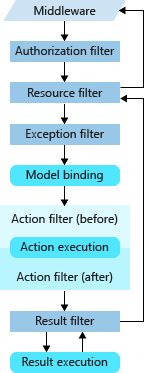
(圖片來源:MSDN)
在執行優序上,Authorization Filter > Resource Filter > Exception Filter > Action Filter > Result Filter
所以如果是在Authorization Filter、Resource Filter階段發生錯誤,
則無法被Exception Filter捉(要自訂錯誤處理方式)。
Filter Attribute可以在三個地方宣告,
在執行順序上,
Startup > Controller > Action,
雖然可以透過Order自訂順序,
但筆者個人認為正常使用下不太會用到,
如果有需要的讀者可參考MSDN。
Authorization可以處理跟授權相關的邏輯,
而授權的方式有很多種,
如簡單型授權、角色授權、宣告式授權等。
當系統功能需要依據某種條件賦予使用權力時,
使用Authorization Filter會是個不錯的用法(你也可以自訂Middleware)。
礙於授權本身範疇較大,
筆者將於後面文章中進行更詳細的說明。
Resource Filter可以依據自訂的條件,
決定是否繼續後面的流水線(Pipeline),
達到為網站節省資源的目的。
使用時必須實作IResourceFilter或IAsyncResourceFilter介面。OnResourceExecuting表Request in的Pipeline,OnResourceExecuted介面則代表Response out。
官方提供的使用時機為限制檔案上傳大小,
這情境雖然簡單但還蠻實用的,
我們迅速的來實作一個IResourceFilter,
如果要使用Attribute的形式則必須要實作Attribute。
public class AllowFileSizeAttribute : Attribute, IResourceFilter
{
    private long maxSize;

    public AllowFileSizeAttribute(long _maxSize)
    {
        this.maxSize = _maxSize;
    }

    public void OnResourceExecuting(ResourceExecutingContext context)
    {
        var contentLength = context.HttpContext.Request.ContentLength;
        if (contentLength > maxSize)
        {
            context.Result = new ContentResult()
            {
                Content = $"You can't upload file size over {maxSize / 1024}KB."
            };
        }

    }

    public void OnResourceExecuted(ResourceExecutedContext context)
    {

    }
}
前端程式碼
我們在任意View中新增一個上傳表單,
請注意一定要給name不然後端會認不得!
<form asp-action="Create" enctype="multipart/form-data">
    <div class="form-group">
        <label class="control-label">檔案上傳</label>
        <input type="file" class="form-control" name="file" />
    </div>

    <div class="form-group">
        <input type="submit" value="Create" class="btn btn-default" />
    </div>
</form>
最後在Action中掛上小巧玲瓏的Attribute,
我們設定檔案大小不得超過2048B(=2KB)。
[AllowFileSize(2048)]
[HttpPost]
public IActionResult Create()
{

    return View();
}
使用Debug模式觀察檔案大小。
測試結果
ActionFilter有同步跟非同步兩種版本 - IActionFilter、IAsyncActionFilter。
依執行前和執行後可分OnActionExecuting、OnActionExecuted兩種方法,
主要可處理輸入值(After ModelBinding)或Controller Context相關結果。
也可直接指定回傳的Result(後面優序的Filter就不會被觸發)。
官方提供範例為處理ModelState驗證結果。
ResultFilter一樣有IResultFilter、IAsyncResultFilter兩種版本。
依執行前和執行後可分OnResultExecuting、OnResultExecuted兩種方法,OnResultExecuted會在回傳Response後呼叫,
所以若有跟Response相關的操作請在OnResultExecuting中處理。
官方有提供ActionFilterAttribute類別,
內容涵蓋了ActionFilter及ResultFilter兩種,
大家可依個人需求搭配使用。

實作IExceptionFilter或IAsyncExceptionFilter可自訂Exception Filter,
官方提供範例為自訂開發環境錯誤頁面,Exception Filter能捕捉的範圍如下:
筆者將於後面獨立一篇介紹Exception Filter與Exception Middleware的使用差異。
自從Middleware出來之後Filter好像就有點被遺棄無力(咦?),
雖然筆者個人比較喜歡Middleware的設計方式(彈性),
不過Filter還是很好用啦XD,
如果文章內容有誤的再麻煩指正,謝謝!





 iThome鐵人賽
 看影片追技術